
StardustTV sells itself on watching for free. Reviewers say its ads on TikTok and Instagram promise whole dramas at no cost, and the app does let you unlock episodes by watching ads instead of paying. The App Store listing averages 4.7 stars over almost 79,000 ratings.
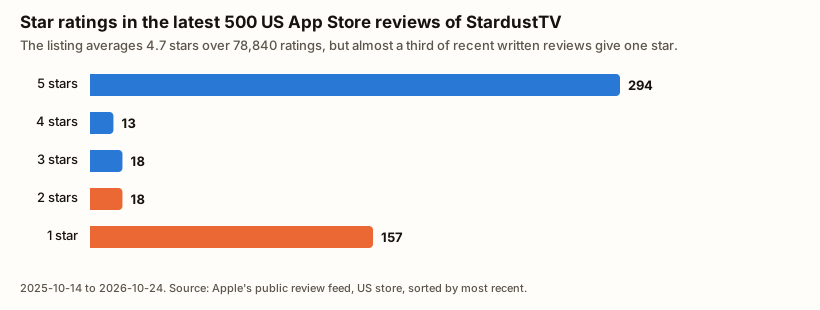
The written reviews tell a harder story. Of the 500 most recent US App Store reviews, 157 give one star. Most of those are about the free promise, the ads, and weekly charges that people say they couldn’t stop.
We read StardustTV’s terms of service, both store listings, its website and those 500 reviews to work out what it costs and who it suits.
What is StardustTV and who is it for?
StardustTV is a free app for vertical short dramas, with episodes of a minute or two. It came to the App Store in July 2024 and is updated often: version 2.47.0 came out on October 20, 2026.
Who runs it depends on where you look:
- App Store and Google Play: Hongxing Media Co., Limited, a Hong Kong company with an address in Tuen Mun, New Territories.
- StardustTV’s website: names its parent company as Jiangxi Xiuyuan Qiusuo Network Technology Co., Ltd., in Jiangxi, China.
- Terms of service: say the service is operated by New Summit Entertainment Inc., a California company with an address in La Verne.
Disputes go to binding arbitration at the Hong Kong International Arbitration Centre, under the terms.
How big it is:
- Google Play: more than 10 million downloads and a 4.5 rating from about 814,000 reviews. Rated Teen, with in-app purchases.
- US App Store: 4.7 from 78,840 ratings. Rated 12+, and the terms also set 12 as the minimum age.
- Languages: the app is offered in about 15, including Arabic, Japanese, Korean, Thai, Turkish and Vietnamese.
StardustTV suits viewers who will trade time for episodes: people happy to sit through ads to keep watching without paying. It suits buyers of its weekly subscription much less, for reasons covered below.
StardustTV’s content library: genres and AI dramas
Genres on StardustTV
The Google Play listing names the genres it leans on: billionaire and CEO romance, werewolf and alpha stories, marriage and divorce, revenge and underdog stories, and fantasy and mystery. The App Store listing adds family conflict and forbidden love.
AI-made dramas
StardustTV is unusually open about AI:
- App Store listing: “Original Dramas Powered by AI”. It says AI-assisted production lets it show larger scenes and safer action sequences.
- Google Play listing: announces a “brand-new AI-generated short drama section”, made with AI “for full-process creation”.
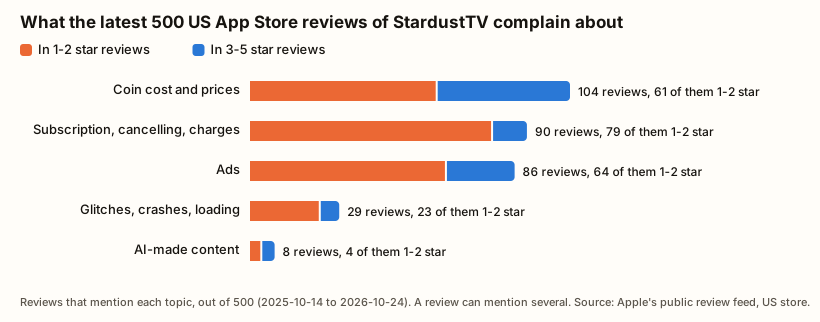
Eight of the 500 recent reviews mention AI, and they are split. One reviewer wrote that “the AI acting is great”. Another asked StardustTV to “at least clearly identify something is AI generated and separate from real-people dramas”. If you want dramas with a human cast, check each title before you spend coins on it.
The StardustTV app: features and playback
The Google Play listing promises HD playback, offline downloads and syncing between phone, tablet and TV. The iOS app needs iOS 15.0 or later and is about 185 MB.
The listing also says there is “No Mandatory Registration”. The terms of service say otherwise: “To use most features of the Stardust TV, you need to register for an account”.
Glitches come up in 29 of the 500 reviews, 23 of them one or two stars. The most damaging reports are about progress: reviewers describe being logged out and losing episodes they had already unlocked, or ads that won’t close and so never pay out their coins.
How much does StardustTV cost? Coins, ads and the weekly subscription
How StardustTV coins work
Locked episodes are paid for with coins. The US App Store lists 500 coins for $4.99 and 2,000 coins for $19.99, so a dollar buys about 100 coins. The terms say coins can only be used in StardustTV and can’t be exchanged for money.
What does an episode cost?
StardustTV doesn’t publish episode prices. App Store reviewers do name them:
- Price: of the 10 reviews in the US, UK, Canadian and Australian stores that give one, 8 say 59 coins an episode. That’s about 59 cents.
- Length: several reviewers say the episodes you unlock are much shorter than the free ones, often 30 to 50 seconds.
If both hold, an unlocked minute of drama costs more than a dollar.
The weekly subscription
The App Store lists a weekly subscription at $19.99 and at $29.99, with discounted weekly plans at $24.99 and $29.99. Other purchases are listed only as “Subscription” ($1.99, $14.99 and $19.99) or “One-time Purchase” ($9.99), without saying what they buy.
The App Store listing explains the main plan:
- What you get: while it’s active, you can watch all stories free.
- Length: 7 days.
- Renewal: it renews automatically, and you’re charged within 24 hours before each new week until you cancel.
Can you watch StardustTV for free?
Partly, and slowly. Every series starts with free episodes. After that you can earn coins from a daily check-in and from rewarded ads. Some reviewers like this: one called it “fairly easy to earn coin”, and another said there’s “no need to pay for subscription”.
More reviewers find the free route frustrating:
- Ads per episode: two or three ads to unlock one episode, and the ads often run longer than the episode.
- Daily limit: a cap on how many rewarded ads you can watch each day.
- Coins per ad: one reviewer reported 5 coins per ad, against a 59-coin episode.
Ads come up in 86 of the 500 reviews, 64 of them one or two stars.
Is StardustTV worth the money? StardustTV vs Netflix
Netflix’s US plans cost $8.99 a month with ads and $19.99 for Standard after the March 2026 price rise. StardustTV’s cheapest listed weekly plan costs $19.99, the same as a month of Netflix Standard, but for one week. If it renews all month, that’s about $87, or about $130 at $29.99 a week. A weekly plan makes sense only for a short binge you cancel straight away.
What recent App Store reviews say
StardustTV gets fewer written reviews than the biggest apps, so its 500 most recent US reviews stretch back a full year, from October 14, 2025 to October 24, 2026. They split sharply: 294 give five stars and 157 give one. Praise for the stories comes up in 114 of them.
Three complaints stand out:
- “Advertised as free”: 23 reviews say the app was advertised as free, often in an ad on TikTok, Instagram or Facebook, and then asked for money or endless ads. “Bait and switch”, one wrote.
- Charges that don’t stop: 29 reviews describe being unable to cancel, being charged twice, or being charged after cancelling, some for months.
- Charges outside the App Store: one reviewer has been charged “$20 a week” for a subscription that “doesn’t show up in my App Store subscriptions”. Another bought a weekly pass on StardustTV’s website, and it then vanished from both the app and the site.
We can’t verify what any single reviewer experienced. But subscriptions and cancelling come up in 90 of the 500 reviews, and 79 of those give one or two stars.
Refunds and support
The terms don’t offer refunds: “The virtual product has been purchased and cannot be returned or exchanged.”
Where to turn depends on how you paid:
- Through Apple or Google Play: cancel and ask for a refund there. On iPhone, go to Settings, tap your name, then Subscriptions. Deleting the app does not cancel a subscription.
- On StardustTV’s website by card: the subscription won’t show up in your phone’s store. A reviewer described cancelling inside the app, under Profile, then Help & Feedback, where a chat assistant offers a cancel button. If charges continue, your card issuer can block them.
StardustTV’s listings give [email protected] and [email protected] for support.
StardustTV pros and cons
Pros:
- Free to download, with free episodes at the start of every series.
- You can keep watching by watching ads instead of paying.
- Open about which of its dramas use AI, at least in its store listings.
- Offline downloads and about 15 app languages.
Cons:
- Reviewers say its social media ads promise free viewing that the app doesn’t deliver in full.
- Unlocked episodes are often very short, by reviewers’ accounts.
- Episode prices aren’t published (reviewers report 59 coins).
- Weekly plans of $19.99 to $29.99 renew automatically.
- Cancelling is the main subject of one-star reviews, especially after website payments.
- Three different companies named across its listings, website and terms.
StardustTV vs ReelShort vs DramaBox
| StardustTV | ReelShort | DramaBox | |
|---|---|---|---|
| Publisher | Hongxing Media Co., Limited (Hong Kong) | Crazy Maple Studio | STORYMATRIX PTE. LTD. (Singapore) |
| Coins per dollar | about 100 (500 coins for $4.99) | about 100 (500 coins for $4.99) | about 100, by reviewers’ reports |
| What a locked episode costs | about 59 cents, by reviewers’ reports | about 60 cents, by ReelShort’s own guide | about 50 cents, by reviewers’ reports |
| Weekly plan | $19.99 or $29.99 on the App Store | Weekly VIP, $19.99 on the App Store | memberships from $5.99 to $19.99 |
| US App Store rating | 4.7 from 78,840 ratings | 4.7 from 514,345 ratings | 4.8 from 885,956 ratings |
Per coin, StardustTV costs about the same as ReelShort and a little more than DramaBox. Where it differs is the free route through ads, which reviewers say its advertising pushes hard, and its weekly plan, which tops out higher than either rival’s.
For the details, see our ReelShort review, DramaBox review, ShortMax review, GoodShort review, KalosTV review and the ranking of the best short drama apps.
StardustTV review: our verdict
StardustTV has a real free route: you can keep watching by sitting through ads, and some reviewers are happy with that deal. It’s also more open than most apps that many of its dramas are made with AI.
What holds it back:
- The free promise: by reviewers’ accounts, its advertising oversells it.
- Short episodes: unlocked episodes are short by reviewers’ accounts, so each coin or ad buys less.
- Weekly plans: $19.99 to $29.99, renewing automatically.
- Cancelling: an unusually high share of one-star reviews come from people who say they couldn’t stop paying.
Our rating: 2.5 out of 5. The free route and the library would earn a 3.5. The billing complaints and the gap between the ads and the app pull it down.
Download StardustTV if you’re happy to earn episodes with ads and never pay. Don’t subscribe through the website. If you do take a weekly plan, buy it through Apple or Google Play so you can cancel it there, and turn off renewal the same day. When you’re ready, open StardustTV and start with the free episodes.
FAQ
Is StardustTV really free?
Partly. The app is free and every series starts with free episodes. After that you need coins, which you buy or earn through a daily check-in and rewarded ads, or a weekly subscription. Reviewers say the ad route works but is slow, with two or more ads per episode and a daily ad limit.
How much does StardustTV cost?
The US App Store lists 500 coins for $4.99, 2,000 coins for $19.99, and weekly subscriptions at $19.99 and $29.99. StardustTV doesn’t publish episode prices. App Store reviewers most often report 59 coins an episode, about 59 cents.
Who owns StardustTV?
The App Store and Google Play list Hongxing Media Co., Limited, a Hong Kong company. StardustTV’s website names a parent company in Jiangxi, China. Its terms of service say the service is operated by New Summit Entertainment Inc., a California company.
Are StardustTV dramas made with AI?
Many are. StardustTV’s App Store listing advertises “Original Dramas Powered by AI”, and its Google Play listing describes an AI-generated drama section.
How do I cancel StardustTV?
If you subscribed through Apple or Google Play, cancel in that store at least 24 hours before renewal. On iPhone, go to Settings, tap your name, then Subscriptions. If you paid on StardustTV’s website, cancel in the app under Profile, then Help & Feedback. If charges continue, contact your card issuer.
Can I get a refund from StardustTV?
StardustTV’s terms say purchases “cannot be returned or exchanged”. For purchases made through Apple or Google Play, ask the store for a refund.
Sources
StardustTV’s store listings, terms of service and website were read in October 2026. Review counts come from the 500 most recent US App Store reviews in Apple’s public review feed. Episode prices come from App Store reviews in the US, UK, Canada and Australia that name one.
- App Store listing (seller, ratings, version, age rating, languages, in-app purchases, subscription terms, AI description): https://apps.apple.com/us/app/stardusttv-short-drama-movie/id6502377927
- Google Play listing (downloads, rating, developer address, genres, features, AI section): https://play.google.com/store/apps/details?id=com.shdj.test
- StardustTV terms of service (operator, minimum age, account, coins, no returns, arbitration): https://us-prod-app-h5.stardusttv.cc/UserAgreement.html
View all 6 sources
- StardustTV website (company and parent company): https://www.stardusttv.cc/
- Netflix US prices after the March 2026 increase (Fox): https://www.foxla.com/news/netflix-raising-prices-again-all-plans-how-much-more-youll-be-paying
- ReelShort and DramaBox coin, VIP and rating figures: our ReelShort review and DramaBox review and their sources